Multiple Git Remotes
A remote is a named pointer to another copy of a repository — nothing more. origin is only a convention: the name git clone gives the remote it cloned from. A repo can have any number of remotes with any names, and that’s how one local repo pushes to both a self-hosted GitLab and GitHub.
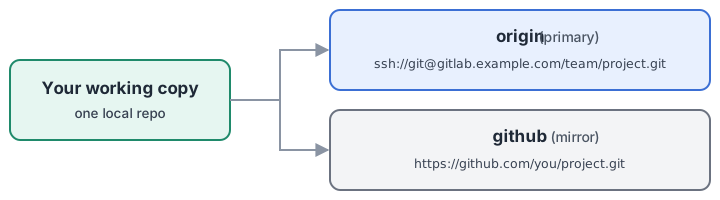
The commands
git remote -v                          # list remotes and their URLs
git remote add github <url>            # add a second remote named "github"
git push github master                 # push a branch to a specific remote
git remote rename origin gitlab        # names are yours to choose
git remote remove github               # detach (never touches the remote repo)
Fetch and push URLs can even differ per remote ( Corrected 2026-10-02: a remote can have its own push URLs, separate from its fetch URL — and several of them, which is how one git remote set-url --push), though that’s rarely needed.git push reaches two servers. See One push, two servers: push URLs below.
Upstream tracking — where a bare git push goes
Every local branch can have one upstream (tracking branch): the remote/branch pair that plain git push, git pull, and git status’s “ahead/behind” compare against. With multiple remotes this is the detail that bites:
git branch -vv            # shows each branch's upstream, e.g. [origin/master]
git status -sb            # first line: ## master...origin/master
git branch -u origin/master   # set (or fix) the upstream explicitly
A branch tracks exactly one upstream — pushing to the other remote is always an explicit git push <remote> <branch>.
Creating the second remote with a CLI (gh, glab)
The hosting CLIs can create the server-side repo and wire the remote in one step. GitHub’s:
gh repo create <name> --private --source . --remote github --push
--source .— use the current repo instead of creating a fresh one--remote github— add the new repo as a remote with this name--push— push the current branch immediately
The trap: --push also re-points the current branch’s upstream to the new remote. From then on, a bare git push goes to GitHub, not to the remote you think of as primary — silently. If the original remote is the primary, restore it right after:
git branch -u origin/master
GitLab’s glab repo create behaves analogously for self-hosted GitLab.
Visibility: private vs public vs internal
Repo visibility is a property of the server-side repo, set at creation (--private / --public; GitLab adds --internal — visible to anyone logged into that GitLab instance, which on a company or self-hosted server is not the same as private). Check, don’t assume:
gh repo view <owner>/<name> --json visibility
A safe habit: default to private and open up deliberately — you can flip private → public in one setting, but nothing un-publishes a repo that was cloned while public.
Keeping the mirror current
Two remotes never sync themselves; every update is an explicit push:
git push origin master && git push github master
For a repo where the mirror must never lag, that pair can live in a small script or a git alias. Accept that the mirror lags otherwise, and treat the primary remote as the source of truth.
One push, two servers: push URLs
Every remote has a url, used for fetching and, by default, for pushing. It can also have one or more pushurl entries. As soon as a remote has any pushurl, git push stops using url and pushes to every pushurl in turn instead. Fetch and pull are untouched: they still use url.
For a C reader: url is a single destination address; pushurl replaces it, for pushes only, with a list that git push loops over.
# primary first, then the mirror — BOTH are needed (see the trap below)
git remote set-url --add --push origin ssh://git@gitlab.example.com/team/project.git
git remote set-url --add --push origin https://github.com/you/project.git
git remote -v        # one (fetch) line, two (push) lines for origin
git push             # now lands on both
What that writes to .git/config:
[remote "origin"]
	url = ssh://git@gitlab.example.com/team/project.git
	fetch = +refs/heads/*:refs/remotes/origin/*
	pushurl = ssh://git@gitlab.example.com/team/project.git
	pushurl = https://github.com/you/project.git
Verified 2026-10-02 with two local bare repos standing in for the servers:
Push URLs on origin | Where git push origin master landed |
|---|---|
| none | the url (the primary) — ordinary behaviour |
| only the mirror’s | only the mirror. The primary got nothing, even though url still names it |
| the mirror’s and the primary’s | both, one after the other in listed order, each reported on its own To … line |
Fetching still came from url throughout.
- The trap is the middle row. Adding just the mirror’s URL silently redirects every push away from the primary. Always add the primary as a push URL as well — first, so it’s pushed first.
- It isn’t atomic. The pushes run in sequence. If the second server rejects the push, the first has already landed, and the error names the URL that failed. Read the
To …lines. - It’s per-clone. It lives in
.git/config, which is never committed, so each person who wants it sets it in their own clone. A fresh clone pushes only tourl. - Upstream tracking is unaffected.
git status’s ahead/behind still compares with the fetch side, so it reports nothing about whether the mirror is current. - Undo:
git remote set-url --delete --push origin <url>, once per URL. When none remain, pushes go back tourl.
Two pushes chained with &&, or push URLs? The explicit pair says on every push where it’s going and stops before the mirror if the primary fails. Push URLs save typing and can’t be forgotten, but they hide the second destination in config. Both are fine; pick one per repo and say which in its README or contributor notes.